WordPress-like editor for Supabase
See how BaseBuddy gives Supabase projects a familiar editor experience without changing the underlying database schema.
Familiar editing, Supabase-owned data
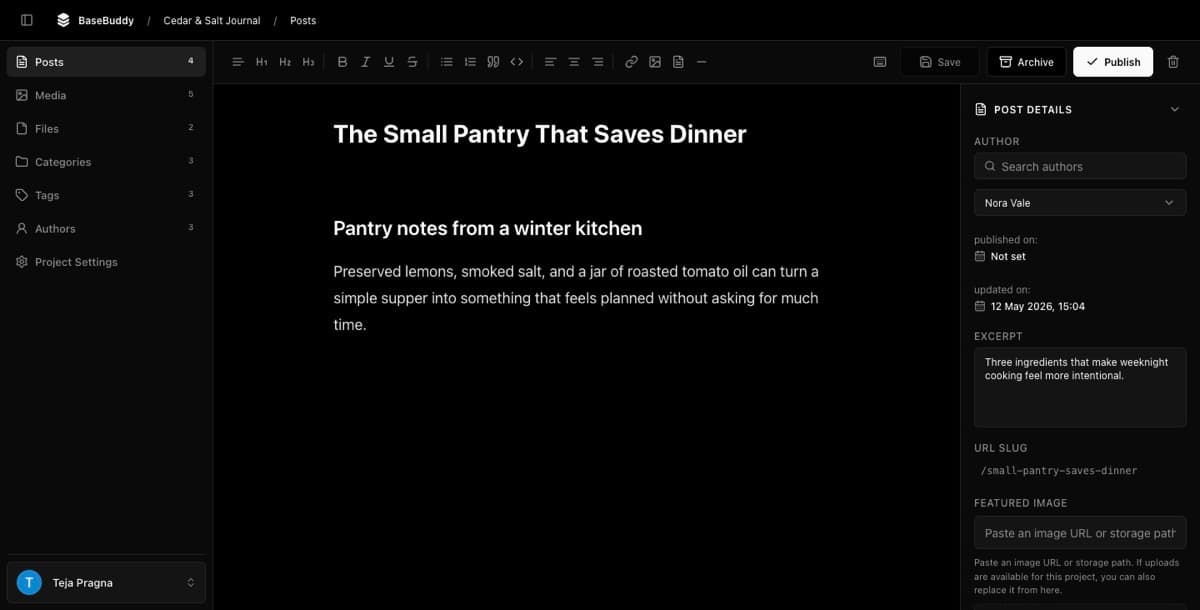
BaseBuddy gives Supabase projects a WordPress-like editor experience while keeping your content in your own Supabase or Postgres tables.
The editor feels familiar because writers can open posts, edit titles and body content, manage media, review SEO fields, and publish intentionally. The data model stays different: BaseBuddy reads your saved mapping instead of forcing all content into a CMS-owned schema.
What “WordPress-like” means here
It means editors get a practical content workflow:
| Editor need | BaseBuddy surface |
|---|---|
| Write and format content | Tiptap editor with Markdown and HTML-friendly storage |
| Add structure quickly | Slash commands and keyboard shortcuts |
| Manage images and downloads | Media and Files libraries backed by Supabase Storage or S3-compatible buckets |
| Edit post metadata | Sidebar fields for author, slug, categories, tags, dates, SEO, redirects, and custom fields |
| Control publishing | Explicit Publish, Unpublish, and Archive actions |
| Manage access | Roles, member-specific permissions, and author-scoped access |
It does not mean BaseBuddy copies WordPress internals or asks you to migrate into a WordPress schema.
The mapping layer is the difference
BaseBuddy maps your existing database to the editor.
For example, your title may live in posts.heading, your body may be Markdown in posts.body_md, your author may be a relation to profiles, and your featured image may be a storage path. BaseBuddy can present those as a clean editor because the mapping records the storage target and value shape.
Why this matters
Many Supabase apps already have good database design. The hard part is giving non-developers a comfortable way to edit that content.
BaseBuddy is meant for that gap. You keep the schema your app uses, then add an editor around it. If a field cannot be safely updated, BaseBuddy should show it as read-only or unsupported instead of guessing.
Safe editing rules
The editor is intentionally narrow when it writes.
- Opening a post does not change content.
- A normal save writes changed mapped fields only.
- Save does not secretly publish or archive content.
- Workflow actions are separate buttons.
- Markdown and HTML storage formats are not silently converted during normal save.
Read Safe editing model before connecting production content.
Try the flow
Use the hosted demo to feel the editor first, then install BaseBuddy locally and map one low-risk table.
After setup, follow How to safely edit your first post. That guide walks through the important production habit: change one harmless field, save it, and confirm only that mapped value changed in the database.