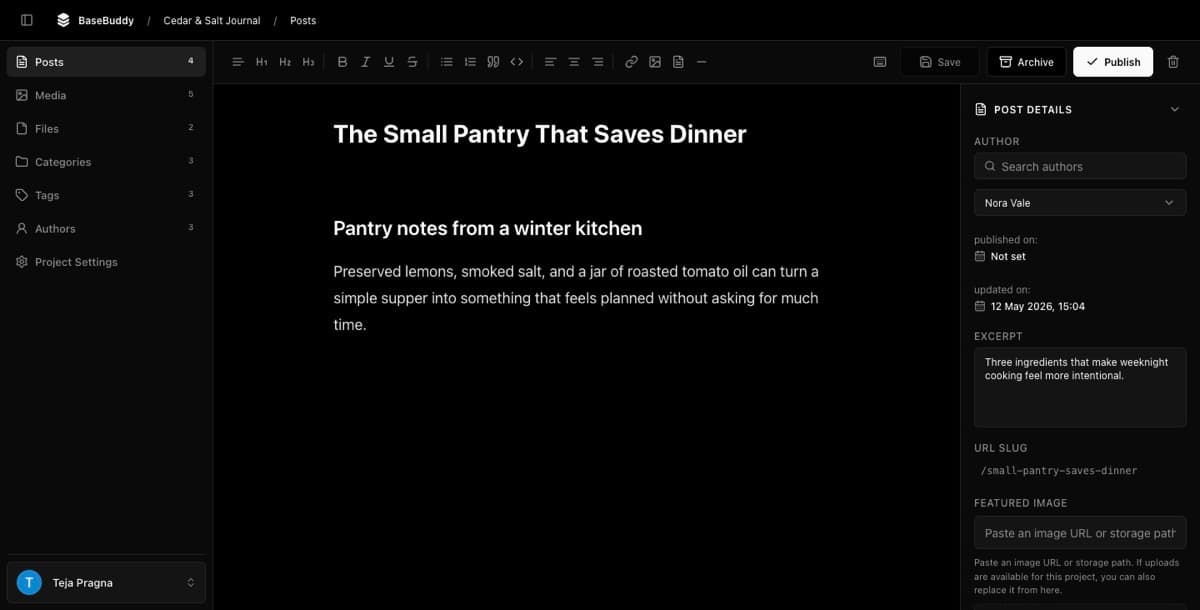
CMS for existing Postgres database
See how BaseBuddy turns an existing Postgres database into an editor without forcing a new CMS content model.
Keep the database your app already uses
Many apps already have a good Postgres schema. The problem is not the database. The problem is that writers, support teams, marketers, or operations people need a safe way to edit content without opening a database admin tool.
BaseBuddy is meant for that exact gap. It lets you map existing Postgres tables into an editor, then saves changes back through the mapping.
Existing schema support matters
Traditional CMS setup often starts with new content types inside the CMS. That can be useful for greenfield sites, but it is painful when your app already has tables, relations, slugs, authors, statuses, and public routes.
BaseBuddy starts with the database:
The saved mapping records where each value lives, what shape it has, and how safely it can be edited.
Projects and mappings explains how that mapping becomes runtime truth, and Storage contract and UI explains why UI controls start from storage shape.
What can become editable
BaseBuddy can turn common content areas into editor surfaces when they are mapped clearly.
| Existing data | Editor result |
|---|---|
| A posts, articles, pages, or docs table | Main content list and editor |
| Text, Markdown, HTML, or supported JSON paths | Title, body, excerpt, SEO, and custom fields |
| Author/profile relations | Author selectors and author-scoped access |
| Category and tag relations | Taxonomy controls |
| Storage paths or catalog rows | Media and file fields |
| Status and date fields | Explicit publish-state controls when mapped |
Unsupported mappings should stay read-only or unsupported. BaseBuddy should not guess and rewrite a storage shape it does not understand.
For authors, taxonomy, media, and files, the task guides are How to set up authors on BaseBuddy, How to map categories on BaseBuddy, How to map tags on BaseBuddy, and Media and files.
What to test first
Start with one low-risk table in a development database or production copy. Map title, content, slug, and status. Open one row, change one harmless text field, save it, and confirm only that field changed.
After that works, add relations, media, files, SEO fields, redirects, permissions, and deployment checks.
Use How to safely edit your first post when you are ready to test the first save.