Mapping fields and relations
Map scalar fields, semantic roles, authors, categories, tags, helper rows, join tables, and relation selectors.
Field mapping
Field mapping tells BaseBuddy how one editor field connects to storage. The simplest case is a direct column, like a title stored in posts.title.
Real schemas get more complex. A value might live in a JSON path, a helper row, a join table, an array, or a relation target. BaseBuddy handles these shapes as long as the mapping is explicit enough to read and write safely.
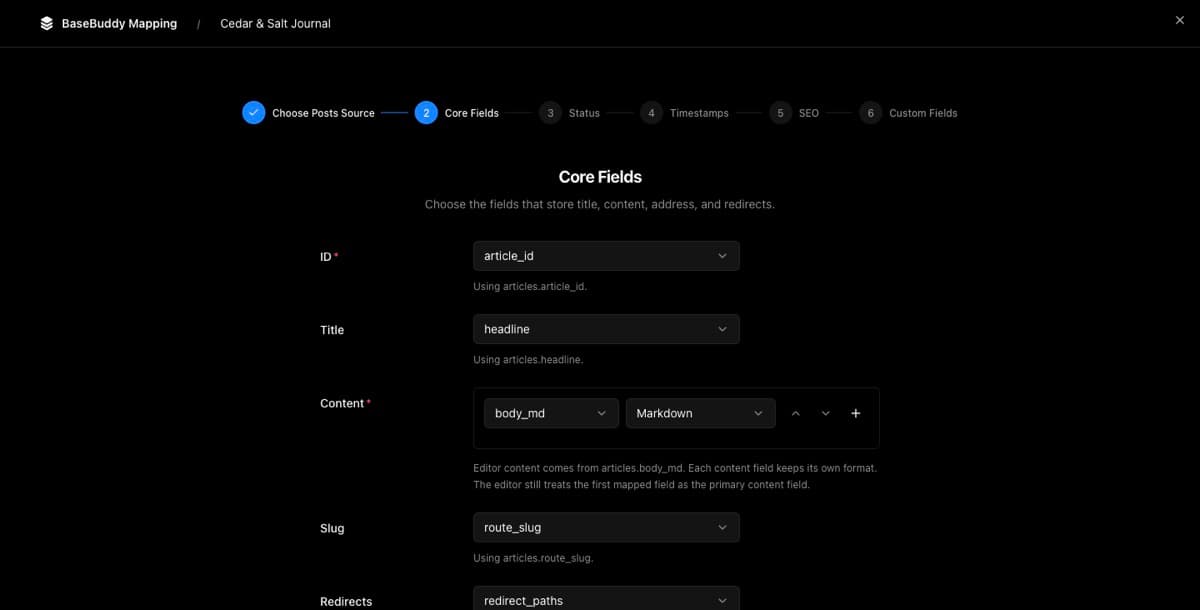
The field-level rules come from Storage contract and UI. If you are using the app right now, How mapping works on BaseBuddy shows where those choices appear in settings.
Common field roles
| Role | Common storage examples |
|---|---|
| Title | title, headline, name |
| Slug | slug, route_slug, permalink |
| Content | body, content, body_md, payload.body |
| Excerpt | excerpt, summary, dek |
| Status | status, state, published, is_live |
| Published date | published_at, published_on, live_at |
| SEO | seo_title, meta.description, helper SEO row |
Don't force a role onto the wrong storage. The semantic role helps BaseBuddy understand behavior, but saves still follow the storage contract.
Markdown content, SEO fields, and redirects each have extra storage expectations, so use How to map Markdown content safely, How to map SEO fields on BaseBuddy, and How to map redirects on BaseBuddy when those roles are part of your project.
Mapping relations
Relations connect a post to another table or set of rows. Authors, categories, and tags are the most common.
| Relation shape | Typical use | Editor control |
|---|---|---|
| Foreign key | One author stored as author_id | Single selector |
| Join table | Many tags through post_tags | Multi selector |
| Value-match relation | Stored slug points at target slug | Selector backed by target value |
| Helper row | One related metadata row per post | Normal field controls through helper row |
| Polymorphic relation | One link table points at multiple owner types | Editable only when discriminator rules are explicit |
Author mapping
Author mapping matters for both display and permissions. If you use author-scoped access, BaseBuddy needs to know how a post belongs to an author.
Author-scoped members can only see or edit content assigned to their allowed author scope. If the author mapping is missing or unclear, authored permissions can't be trusted.
Set the author records with How to set up authors on BaseBuddy, connect posts with How to map authors to posts on BaseBuddy, then review the access behavior in Permissions and teams.
Categories and tags
These can be direct text arrays, relation tables, join tables, or custom taxonomy structures. Map the actual storage shape rather than trying to squeeze everything into one taxonomy model.
For large relation sets, BaseBuddy uses search instead of loading everything at once. Selected values stay visible while the full option set loads through bounded search.
Use How to map categories on BaseBuddy and How to map tags on BaseBuddy for the task-level flows.
When a field should be read-only
Mark a field as read-only when it's generated, view-derived, trigger-managed, unsafe to patch, or only meant for display. Being upfront about read-only is better than pretending a field can be safely edited.
When the editor already shows a read-only state, start with How to fix a field showing as read-only before changing production mapping.