Safe editing model
Understand how BaseBuddy avoids accidental writes, hidden conversions, and unsafe production database changes.
Why this matters
BaseBuddy connects to databases that may already power live apps. A content editor shouldn't break your app because someone opened a post, hit Save without changes, or edited markdown that your app expects to stay as markdown.
The safe editing model keeps normal editing predictable.
What happens when you open a post
Opening a post is read-only. Nothing gets written to your content database.
The editor may load relation labels, media previews, or workflow metadata, but those reads stay bounded. BaseBuddy won't load every post, every author, every tag, or an entire storage bucket just to render one editor page.
What happens on Save
Save sends the fields you changed, along with mapped updatedAt context when the project has that field. No changes? Nothing gets written. One field changed? That field's storage target gets patched, and unrelated data stays untouched.
If updatedAt is mapped to writable date or datetime storage, BaseBuddy may write a fresh timestamp during the save. If the mapped updatedAt field is read-only, BaseBuddy treats it as conflict context rather than an editable value.
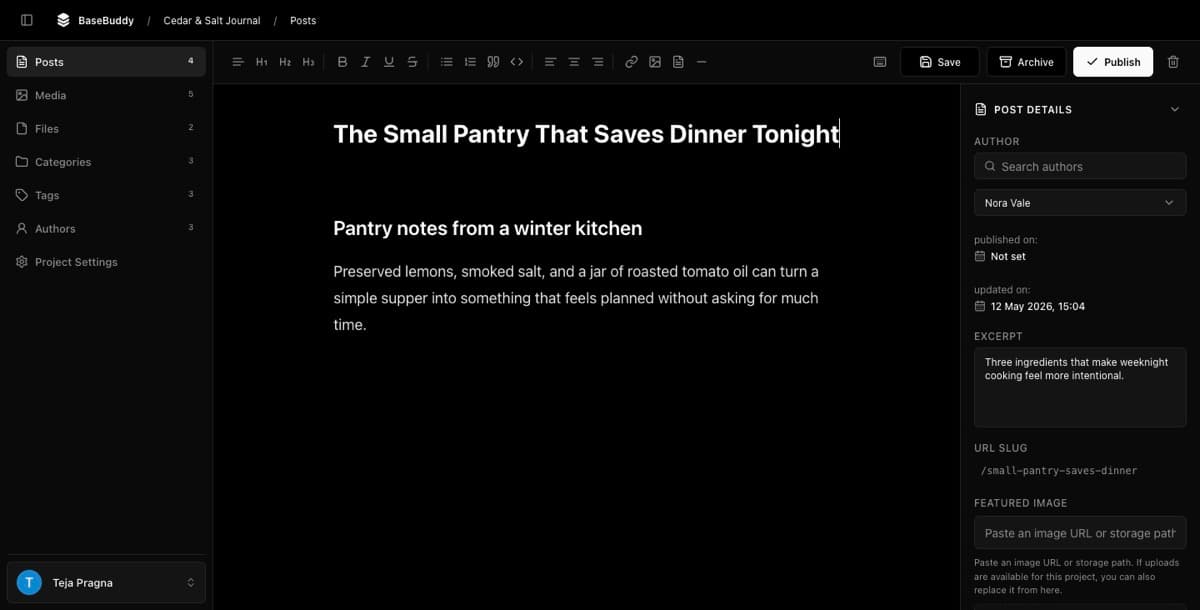
Markdown and rich text
BaseBuddy preserves whatever storage format your mapping declares. If your content field stores markdown, saves keep it as markdown. If it stores HTML, it stays HTML.
The editor can give you rich editing controls, but the data written back always respects the storage contract.
Use How to map Markdown content safely before relying on rich editing across production Markdown fields.
Workflow state is separate
Publishing is a workflow action. It doesn't happen just because you edited body copy and hit Save.
If a normal save touches a mapped workflow status field, BaseBuddy requires publish permission because you'd be changing public workflow state.
Publishing workflows explains why these actions stay separate from normal save.
How to test safety
Before going to production, try these:
- Open a post and confirm the database row doesn't change.
- Click Save without edits and confirm the row doesn't change.
- Edit one harmless text field and confirm only that field changes.
- Edit markdown and confirm it stays stored as markdown.
- Use Publish, Unpublish, and Archive as standalone actions.
How to safely edit your first post is the practical version of this checklist, and How to fix save failures is the next stop when validation or permissions block a write.