Projects and mappings
Create projects, map existing tables, save mapping revisions, and test a mapping before editors use it.
What a project connects
A project connects BaseBuddy to one content area in your database, typically one app or one publication. Most projects start with posts, then grow to include authors, categories, tags, media, files, SEO fields, redirects, and workflow fields.
Create separate projects when schemas, teams, permissions, or editorial workflows are meaningfully different.
If you are creating the first one now, How to create a BaseBuddy project shows the exact form and what should happen after submit.
You can also create and update projects from the CLI. Use the UI when you want to click through mapping. Use the CLI when an operator or agent needs repeatable setup, schema inspection, mapping drafts, members, permissions, sidebar layout, or storage metadata.
For agent-led setup, start with Agent CLI setup. It shows the exact doctor -> schema:inspect -> mapping:draft -> mapping:explain -> mapping:set path.
Mapping flow
Start with posts
The posts table is your anchor. Map whichever table represents one editable content item. It might be called posts, articles, documents, stories, or something custom.
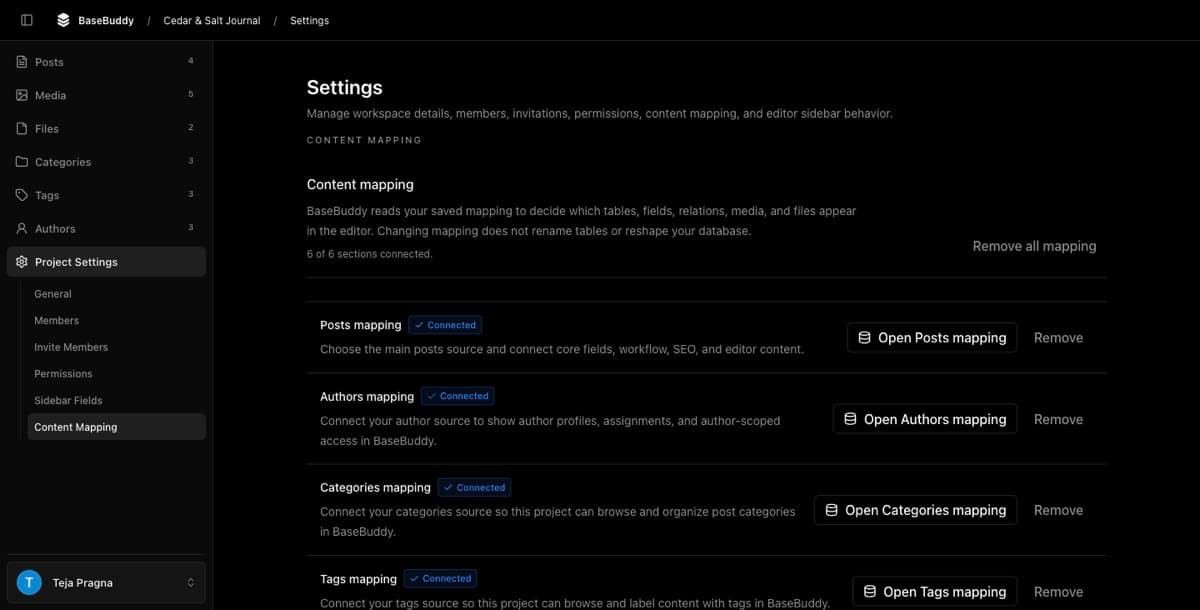
How to map a posts table turns this section into a click-by-click setup flow.
After choosing the table, map the fields that make the editor useful:
| Field | Why it matters |
|---|---|
| Title | Gives editors a readable item name |
| Slug | Connects the editor to public routes |
| Content | Main body field |
| Status | Draft, published, archived, or custom workflow state |
| Published date | Lets workflow actions update publish timing |
| Updated date | Useful when your schema tracks editorial update time |
The control for each field still comes from the storage contract, not the label. Use Storage contract and UI when a field lives in JSON, an array, a helper row, or a relation instead of a simple column. Use Publishing workflows when the mapped field controls status or published dates.
Auto-detect is a starting point
Auto-detection can find common column names and relations, but treat its suggestions as a starting point, not the final answer.
If detection guesses wrong, switch to manual mapping. Manual mapping isn't a fallback for failure; it's how BaseBuddy supports real-world schemas that don't look like a textbook CMS.
How mapping works on BaseBuddy is useful when you want to compare detection with the manual mapping path before saving.
Save a mapping revision
Saving a mapping creates the runtime contract for that project. The editor, content API, validation, save behavior, and workflow logic all use the latest saved mapping.
If you change your database schema later, update the mapping and test again.
Use the CLI for repeatable setup
The CLI updates the same app-data backend that the UI writes. That makes it useful for repeatable setup, agent-driven installs, and controlled changes to projects, members, permissions, mapping revisions, sidebar layout, and storage mapping metadata.
Common project and mapping commands:
bashpnpm basebuddy projects:create --actor-email owner@example.com --name "Docs" --slug docs
pnpm basebuddy projects:list --all --json
pnpm basebuddy schema:inspect --schema public --table posts,authors,categories --json
pnpm basebuddy mapping:draft --schema public --table posts --hints mapping-hints.json --json
pnpm basebuddy mapping:explain --input mapping.json --json
pnpm basebuddy mapping:get --project docs --json
pnpm basebuddy mapping:validate --input mapping.json --json
pnpm basebuddy mapping:set --project docs --input mapping.json --binding-status ready --json
pnpm basebuddy sidebar:set --project docs --input sidebar.json --json
pnpm basebuddy storage:set --project docs --library media --provider supabase_bucket --bucket media
schema:inspect is the key command for agents. It lets the agent see table names, columns, primary keys, foreign keys, enum values, and sample rows from the connected database before drafting mapping JSON.
mapping:draft creates a normalized mapping draft from that inspection. Use mapping:explain before saving so you can confirm the source table, editor fields, custom fields, workflow, and storage metadata.
For automation, use Agent CLI setup and CLI reference instead of hand-editing the config file.
Test before inviting editors
Open one mapped post, confirm the fields render correctly, save one safe field, and verify the change in the database. Then test relations, media, workflow actions, and role permissions.
Broken mappings are easier to fix before your team starts using them.
Use How to safely edit your first post for the first write test, then How to invite users to your BaseBuddy project after the mapping and permissions are proven.