How to map redirects on BaseBuddy
Map old post paths or slugs to the redirect data field your app already uses, then verify BaseBuddy edits only that mapped data.
Use this when your posts table already stores old paths, aliases, or redirect rows and you want editors to manage that data in BaseBuddy.
BaseBuddy edits the mapped redirect data. It does not serve HTTP redirects for your public website. Your app or website must read the stored redirect data and decide how to route old URLs.
Before you start
Make sure you know where your app stores redirect data for each post.
Common shapes include:
| Storage shape | Example | What BaseBuddy edits |
|---|---|---|
| Array column | redirect_paths text[] | The whole list of redirect sources |
| JSON or JSONB column | seo.redirects or redirects jsonb | The mapped JSON value or path |
| Text-like column | redirect_history text | A normalized JSON array string |
Use the same source format your site expects, such as old-post or /old-post. BaseBuddy stores the value you enter; it does not decide whether your public app should match slugs, paths, locales, or domains.
Open Posts mapping
- Open your BaseBuddy project.
- Open
Project Settings. - Select
Content Mapping. - In
Posts mapping, clickOpen Posts mapping.
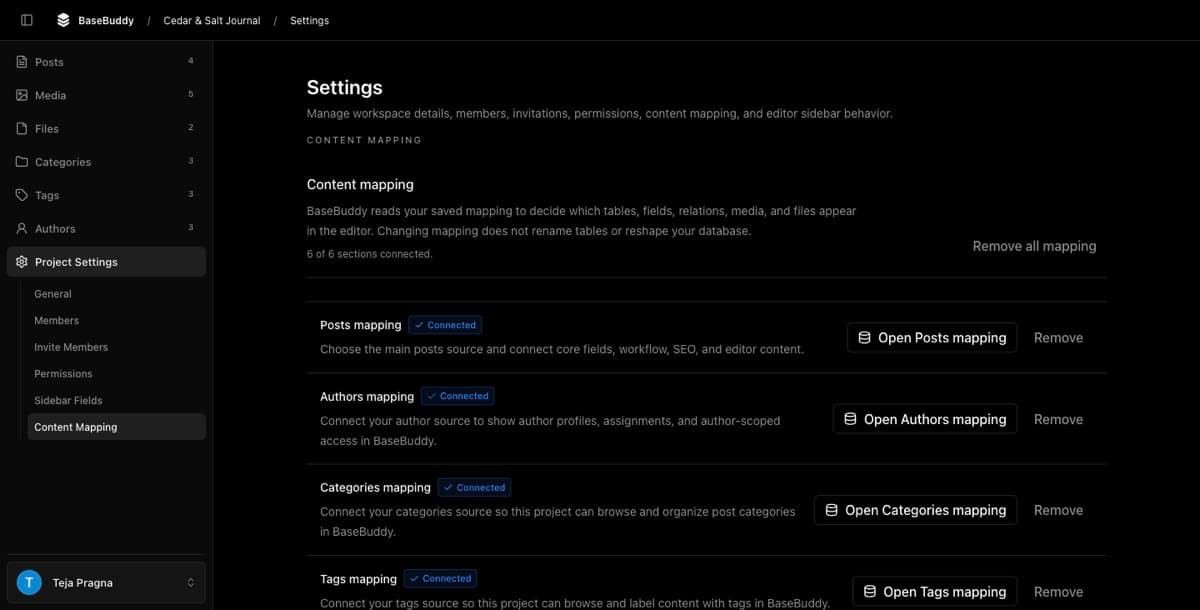
If your project is not mapped yet, the main editor may show Map Posts. That opens the same posts mapping flow.
Choose the Redirects field
On Core Fields, find Redirects and choose the column that stores old paths, old slugs, aliases, or redirect history for the post.
For array columns, BaseBuddy uses the whole array as the redirect list. Redirects are list-valued, so BaseBuddy does not map only one selected array item for the normal redirects field.
For JSON columns, use the JSON path control when the redirect list is stored inside a larger JSON document. Choose the narrowest path that contains only the redirect data you want BaseBuddy to edit.
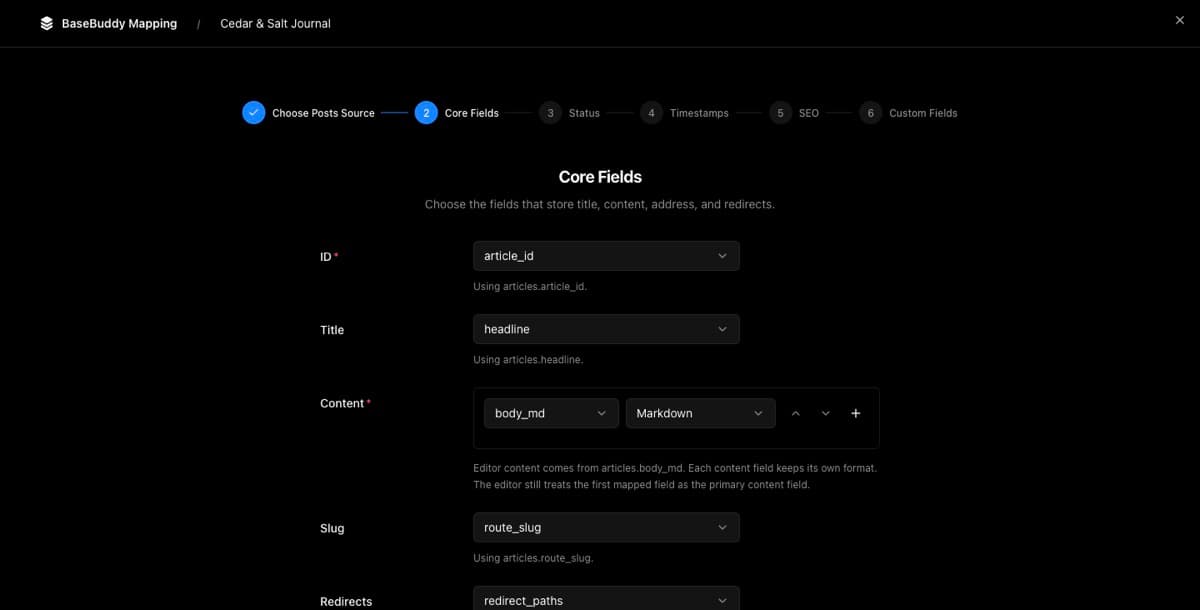
Continue through the remaining posts mapping steps. On the final step, click Finish, review the confirmation, then click Save mapping.
What editors can change
After the mapping is saved, open a post and check Post Details for Redirects.
BaseBuddy supports two redirect editing modes:
| Mode | When it appears | Editable data |
|---|---|---|
| Slug list | Array-backed redirects and list-only mappings | Redirect source strings only |
| Structured rows | Supported JSON or text-like mappings | Redirect source, status code, locale, and active state |
BaseBuddy normalizes redirect entries before saving. It trims sources, ignores blank entries, removes duplicate sources, and parses numeric status codes when structured rows are supported.
If you change a mapped post slug and the redirects field is mapped, BaseBuddy adds the previous slug to the redirect list. It also removes the new slug from the redirect list so the current slug does not redirect to itself.
Save and verify
Test redirects on one safe draft or low-risk post first.
- Open a post.
- Add one old path or slug in
Redirects. - Click
Save. - Inspect the mapped row in Supabase or your database client.
- Confirm the redirect column or JSON path contains the new value.
- Confirm unrelated fields did not change.
Normal Save writes dirty mapped fields only. If you only changed redirects, the redirect storage target should be the only content value changed, aside from database-managed timestamps or triggers your own schema controls.
To verify public redirect behavior, test your website separately. BaseBuddy has completed its job when the mapped redirect data is saved correctly. Your public app still needs redirect logic that reads that data and returns the right HTTP response.
Common issues
| Issue | What to check |
|---|---|
Redirects is missing in the editor | Reopen Project Settings -> Content Mapping -> Open Posts mapping and confirm the Redirects field is mapped. |
| The field is read-only | The mapped storage may be unsupported, generated, view-derived, or unsafe to patch. Choose a supported source or keep it read-only. |
| Structured fields do not appear | The mapping only supports a redirect source list. Array-backed mappings are list-only. |
| Save rejects status code, locale, or active state | The redirect storage is list-only. Use source strings only, or remap to supported structured storage. |
| The database value updates but the website does not redirect | BaseBuddy only edits the data. Update your public app or site so it reads the mapped redirect data and serves HTTP redirects. |
| Old slug was not added after changing a slug | Confirm both Slug and Redirects are mapped and writable for that post. |
If the mapping looks unsafe or the field stays read-only, use How to fix a field showing as read-only before editing production redirect data.
What this guide does not cover
This guide is for content redirects stored with posts.
It does not cover BaseBuddy sign-in or invite return paths. For login and invite flow checks, use How to verify BaseBuddy sign-in setup.
It also does not explain how to implement HTTP redirect handling in your public app. BaseBuddy stores and edits the mapped data your app can consume.
Related guides
- How to map a posts table
- How mapping works on BaseBuddy
- How to fix a field showing as read-only
- How to safely edit your first post